your script, invisible to them. confidence in every call. present flawlessly. maintain eye contact. engage your audience. your script, invisible to them. confidence in every call. present flawlessly. maintain eye contact. engage your audience. your script, invisible to them. confidence in every call. present flawlessly. maintain eye contact. engage your audience.
confidence in every call. present flawlessly. maintain eye contact. engage your audience. your script, invisible to them. confidence in every call. present flawlessly. maintain eye contact. engage your audience. your script, invisible to them. confidence in every call. present flawlessly. maintain eye contact. engage your audience.
Teleprompter for Zoom, Teams & Google Meet

Keep eye contact.
Read your script.

A teleprompter placed beside your camera for Zoom, Teams and Google Meet.

Buy for Mac Detecting...
Checking version...
Buy for Windows Checking version...

No cloud access. Internet only for activation.

Private & local • No account • Internet only for activation • Works with Zoom/Teams/Meet

Not distributed via the App Store

Glance is distributed directly from this website. Your OS may ask for a one-time security confirmation — this is expected and safe. You can revert this setting at any time.

macOS

Open the app, then go to System Settings → Privacy & Security and confirm under Security.

Windows

If SmartScreen appears, select More info, then Run anyway.

Install Help

Open Glance safely

Choose your platform and follow the built-in OS prompts. You only need to do this once.

  1. 1Open Glance once from Applications or the downloaded DMG.
  2. 2If macOS blocks it, open System Settings → Privacy & Security.
  3. 3In the Security section, click Open Anyway for Glance.
  4. 4Confirm Open, then authenticate with your password or Touch ID.

Tip: This prompt is expected for apps distributed directly outside the Mac App Store or Microsoft Store.

Notes that don’t look like notes
01

Side glance looks like thinking.

Briefly looking away to the side is a natural human trait often interpreted as thoughtful pause or reflection.

02

Down glance looks like reading.

Looking down for even a second is the "tell" that you're reading from a script, breaking the illusion of presence.

03

Cues close to the camera.

Glance keeps your script beside the lens so you can stay present and maintain eye contact while you speak.

04

Stay engaged, always.

Deliver your message with absolute conviction without ever looking away from your audience in the live moment.

Put your script where your camera is.

Our discreet teleprompter overlay is placed by the camera so you can read your script naturally while maintaining perfect eye contact on Zoom, Teams, and Google Meet.

01

Real-time control.

Play, pause, and jump between sections instantly to match the rhythm of your live conversation.

02

Dynamic delivery.

Adjust scrolling speed, font size, and voice-aware auto-pause on the fly without breaking your flow or looking away.

03

Discreet opacity.

Move from barely-there transparency to a more solid reading surface without losing the overlay feel.

04

Snap to camera.

One-click centering under your lens ensures your gaze stays forward for a natural, engaging look.

Step 01

Paste your script.
Drop a Markdown file.

Write your cues directly in Glance or drop an existing Markdown file to stay organized by section automatically.
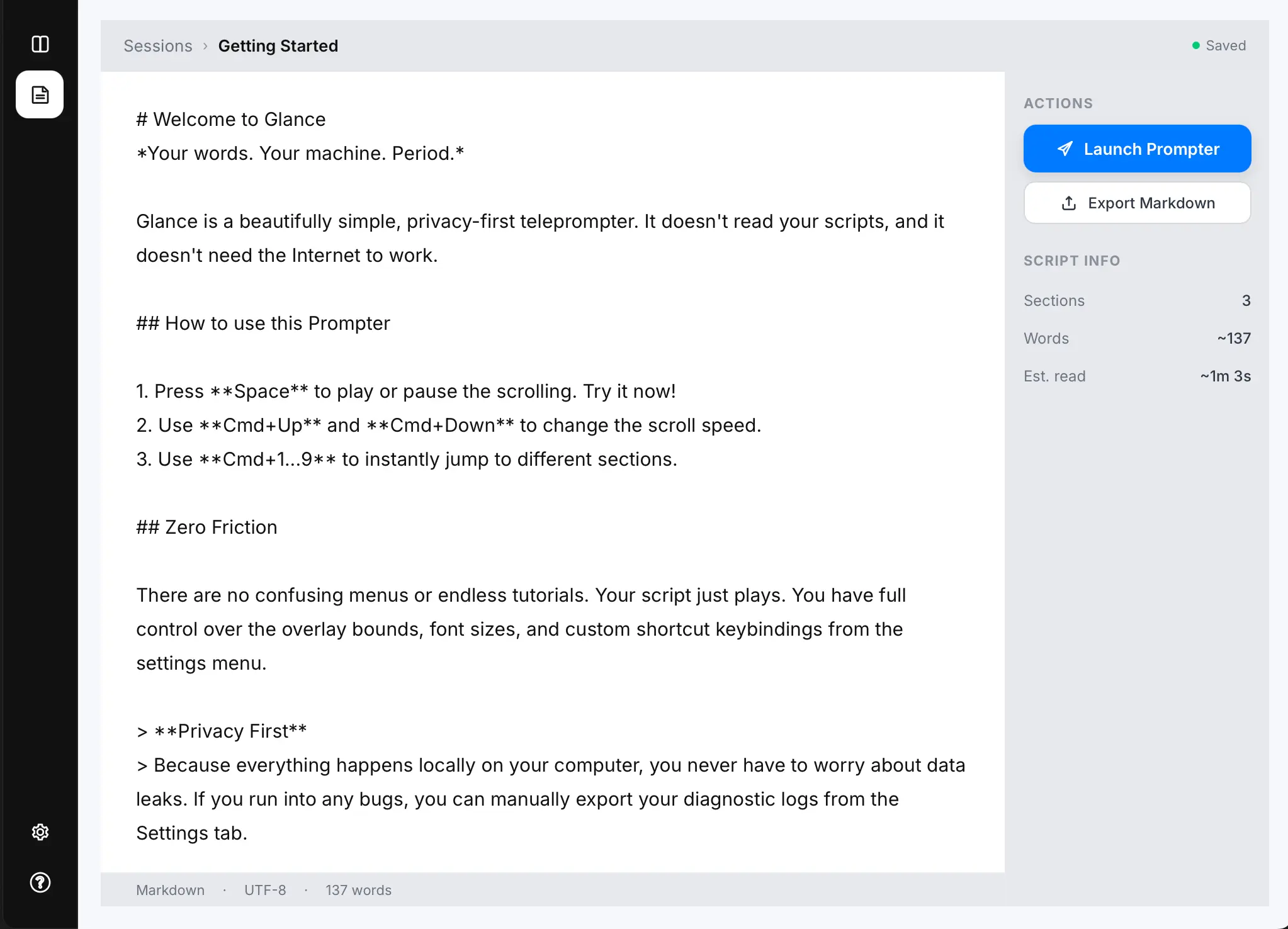
AtGlance markdown teleprompter editor interface
Step 02

Launch the
topmost overlay.

Glance appears near your camera, sitting above Zoom, Teams, or Meet, so your Eyes stay forward.
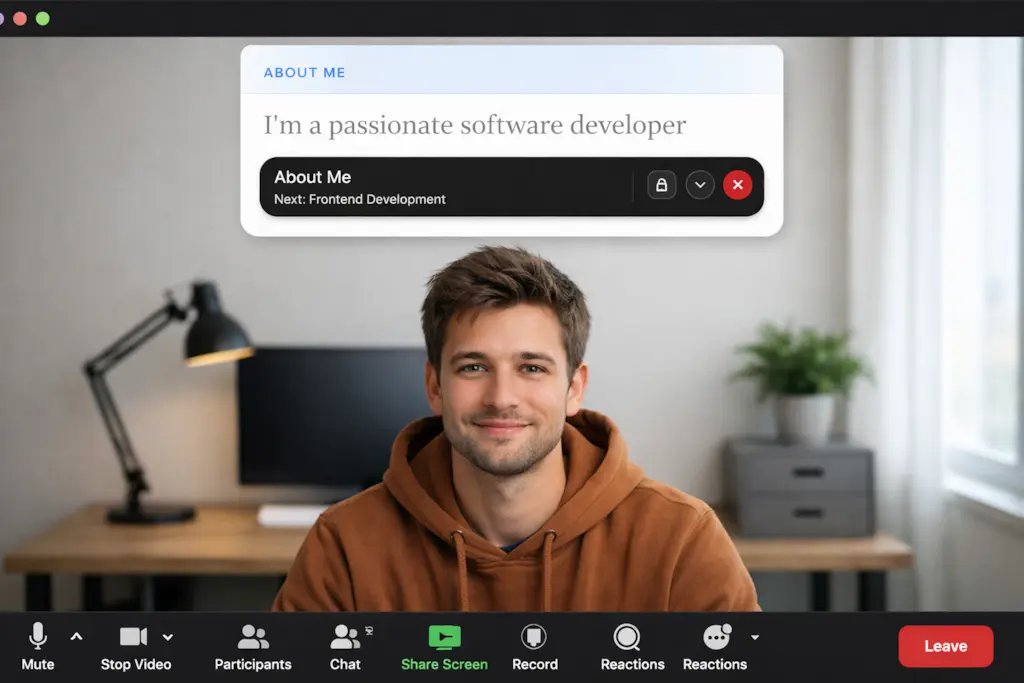
Zoom call with AtGlance teleprompter overlay
Step 03

Control delivery
in real time.

This teleprompter overlay allows you to fine-tune scrolling speed, font size, and pacing on the fly without ever breaking eye contact with your audience.
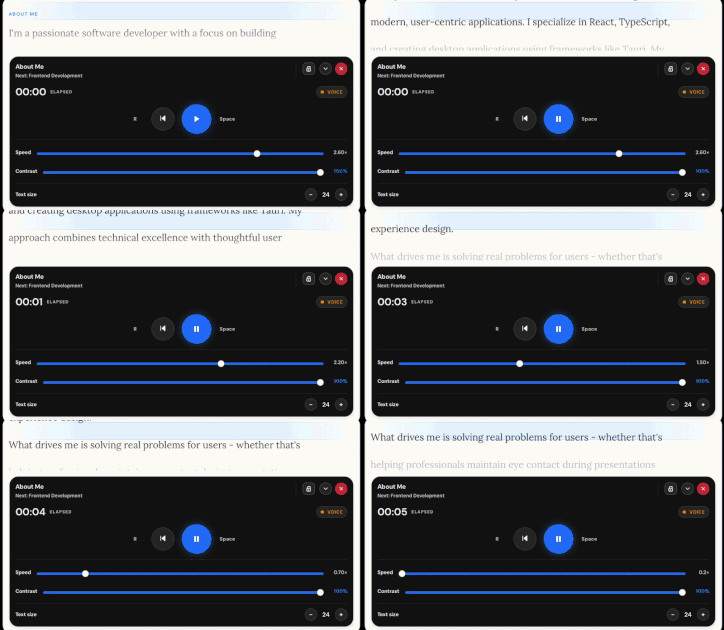
Help screen with keyboard shortcuts and 5-step call flow
Feature image preview of Glance teleprompter
PURPOSE-BUILT

Made for the
live call.

Zoom teleprompter overlay
ZOOM

Interview & Demos.

The perfect overlay for sales demos, client calls, and high-pressure interviews where every word counts.

  • Interviews & client calls
  • Technical sales demos
  • Pitching from your script
TEAMS

Updates & Reviews.

Stay on message during team updates, quarterly reviews, and internal presentations without looking down.

  • Team status updates
  • Strategy reviews
  • All-hands presentations
GOOGLE MEET & OTHERS

Pitches & Creator Vids.

Works with any video app. Nail your hooks, transitions, and calls to action while maintaining eye contact.

  • Google Meet pitches
  • Creator content recording
  • Any web-based conferencing
Privacy by Design

Your words
stay yours.

Glance is designed for private notes. It runs locally on your machine, ensuring your scripts never leave your device.

No Accounts. No Login.
Offline after activation. Works offline on this device.
No Recording Capability.

Not affiliated with Zoom, Microsoft, or Google.

Privacy Shutter Closed
Questions

Frequently asked.

No. Glance is a local overlay that never enters your camera feed. **One tip:** If you choose to share your **entire screen**, the prompter will be visible to others. To keep your script private, always share only the specific **application window** or **tab** you are presenting.

Yes. Glance sits above any app, so it works perfectly with Zoom, Microsoft Teams, Google Meet, and more.

Glance never appears in your camera feed. If you share your entire screen, Glance may be visible (because it’s on your screen). If you share a single window or a browser tab, it usually won’t appear. Always do a quick test with your setup before a live call.

Never. Glance has no recording capabilities. It is a purely visual aid for your own use.

Yes. You can adjust speed and font size on the fly using keyboard shortcuts or the settings menu.

Yes. Turn on Auto-Pause with Voice and Glance will pause after a short silence delay, then resume when you start speaking again. Audio is analysed locally on your device and never recorded.

No account required. Glance is a standalone application that runs on your local machine. Internet is only required to activate your license.

No. Your scripts stay on your device. Glance does not have a cloud component and does not upload your data anywhere.

Yes — macOS and Windows are both supported with native applications.

Ready to look
more confident?