Teleprompter for Zoom, Teams and Google Meet
Keep eye contact. Read your script.
The transparent desktop teleprompter that sits beside your webcam. Maintain natural eye contact and read your notes without looking down.
No cloud access. Internet only for activation.
Private & local • No account • Internet only for activation • Works with Zoom, Teams & Meet
Side glance looks like thinking.
Briefly looking away to the side is a natural human trait often interpreted as thoughtful pause or reflection.
Down glance looks like reading.
Looking down for even a second is the "tell" that you're reading from a script, breaking the illusion of presence.
Cues close to the camera.
Glance keeps your script beside the lens so you can stay present and maintain eye contact while you speak.
Stay engaged, always.
Deliver your message with absolute conviction without ever looking away from your audience in the live moment.
Your words lead the way. Glance follows.
Traditional teleprompters force an artificial, rigid scroll speed. Voice Sync listens through your microphone and highlights each word in real time with buttery spring physics.

Exact & Fuzzy Matching
Handles minor pronunciation slips, contractions, and natural speaking variations without losing your place.

Continuous Fluid Physics
Exponential spring damping glides smoothly line-by-line. When you pause for an breath or a question, the prompter holds steady.

Zero Middleman Privacy
Your audio streams directly from your device to the STT engine via encrypted WebSocket. Glance servers never store, hear, or relay your audio.
Powered by Speechmatics Real-Time STT
Voice Sync requires an external API key from Speechmatics. New accounts on the Speechmatics Portal receive free starting credits (up to $100 in initial credit) with no credit card required upfront, providing ample testing and speaking time.
Disclaimer: Glance is an independent, local-first application and is not affiliated with, sponsored by, or endorsed by Speechmatics Ltd in any way. Speechmatics is a registered trademark of Speechmatics Ltd.
Put your script where your camera is.
Our discreet teleprompter overlay is placed by the camera so you can read your script naturally while maintaining natural eye contact on Zoom, Teams, and Google Meet.
Real-time control.
Play, pause, and jump between sections instantly to match the rhythm of your live conversation.
Dynamic delivery.
Adjust scrolling speed, font size, and voice-aware auto-pause on the fly without breaking your flow or looking away.
Discreet opacity.
Move from barely-there transparency to a more solid reading surface without losing the overlay feel.
Snap to camera.
One-click centering under your lens ensures your gaze stays forward for a natural, engaging look.
Built for conversations that do not follow a script
Unlike traditional studio teleprompters built for rigid speeches, Glance is engineered for interactive video calls where questions interrupt your flow and discussions branch off.
Section jumps
Jump directly to answers or specific talk points using keyboard shortcuts or Markdown heading markers when a client asks an unexpected question.
Voice-aware auto-pausing
Glance automatically pauses scrolling when you pause or answer an interjection, resuming cleanly as soon as you resume speaking.
Quick overlay shutter
Press a hotkey to instantly hide or show your script overlay whenever screen sharing or unscripted Q&A requires your full display.
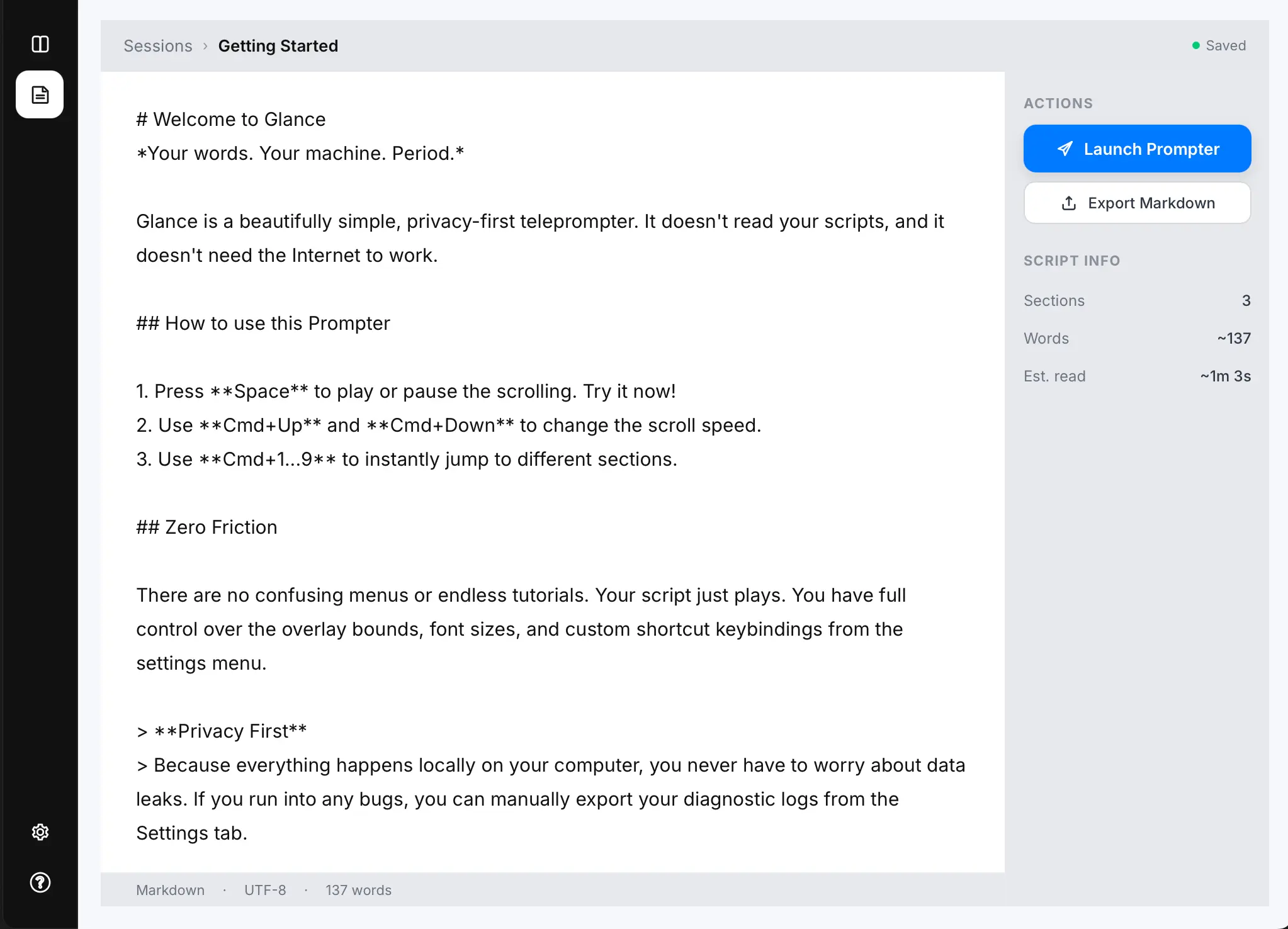
Paste your script.
Drop a Markdown file.
Write your cues directly in Glance or drop an existing Markdown file to stay organized by section automatically.
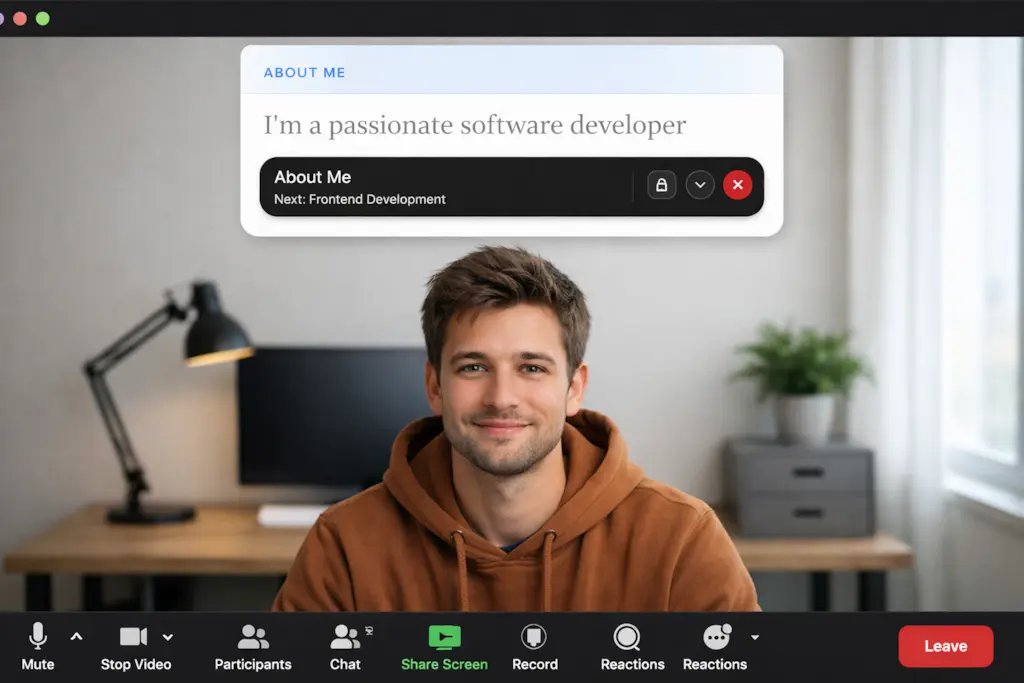
Launch the
topmost overlay.
Glance appears near your camera, sitting above Zoom, Teams, or Meet, so your eyes stay forward.
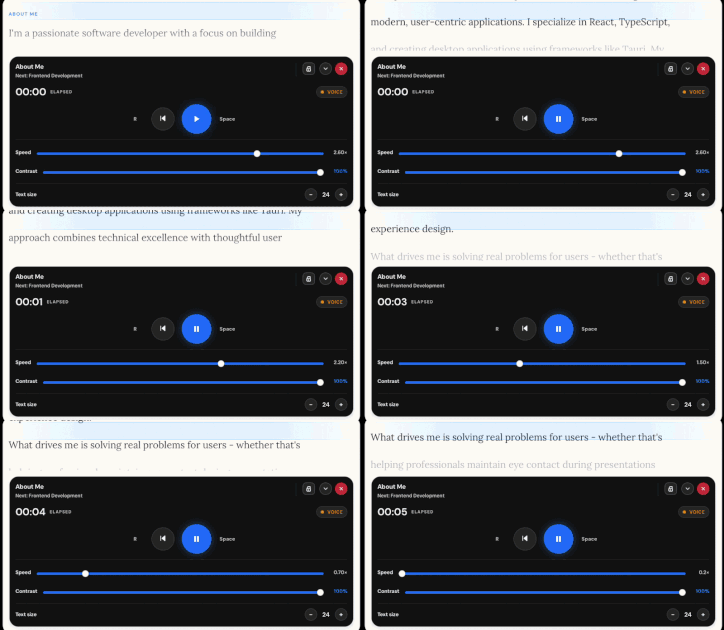
Control delivery
in real time.
This teleprompter overlay allows you to fine-tune scrolling speed, font size, and pacing on the fly without ever breaking eye contact with your audience.
Made for the
live call.
Zoom teleprompter overlay
Interview & Demos.
The perfect overlay for sales demos, client calls, and high-pressure interviews where every word counts.
- Interviews & client calls
- Technical sales demos
- Pitching from your script
Updates & Reviews.
Stay on message during team updates, quarterly reviews, and internal presentations without looking down.
- Team status updates
- Strategy reviews
- All-hands presentations
Pitches & Creator Vids.
Works with any video app. Nail your hooks, transitions, and calls to action while maintaining eye contact.
- Google Meet pitches
- Creator content recording
- Any web-based conferencing
Your words
stay yours.
Glance is designed for private notes. It runs locally on your machine, ensuring your scripts never leave your device.
Not affiliated with Zoom, Microsoft, or Google.
Frequently asked.
No. Glance is a local overlay that never enters your camera feed. **One tip:** If you choose to share your **entire screen**, the prompter will be visible to others. To keep your script private, always share only the specific **application window** or **tab** you are presenting.
Yes. Glance sits above any app, so it works perfectly with Zoom, Microsoft Teams, Google Meet, and more.
Glance never appears in your camera feed. If you share your entire screen, Glance may be visible (because it’s on your screen). If you share a single window or a browser tab, it usually won’t appear. Always do a quick test with your setup before a live call.
Never. Glance has no recording capabilities. It is a purely visual aid for your own use.
Yes. You can adjust speed and font size on the fly using keyboard shortcuts or the settings menu.
Yes. Turn on Auto-Pause with Voice and Glance will pause after a short silence delay, then resume when you start speaking again. Audio is analysed locally on your device and never recorded.
Voice Sync matches words from your microphone against your markdown script in real time, automatically highlighting your current spoken word and gliding forward with smooth spring physics. It requires a free or paid API key from Speechmatics (portal.speechmatics.com). Speechmatics provides free starter credits upon signup (typically up to $100 in usage value) with no credit card required upfront. Disclaimer: Glance is an independent application and is not affiliated with, sponsored by, or endorsed by Speechmatics in any way.
No account required. Glance is a standalone application that runs on your local machine. Internet is only required to activate your license.
No. Your scripts stay on your device. Glance does not have a cloud component and does not upload your data anywhere.
Yes — macOS and Windows are both supported with native applications.
Ready to look
more confident?
No cloud access.